Playground
Test your chatbot's responses and evaluate its knowledge without starting a real customer conversation.
What is the Playground?
The Playground is a testing environment where you can interact with your chatbot through a simple chat interface.
It lets you experiment with questions, review your bot's responses, and see how well it handles different situations without having to start a real customer conversation.
Use the Playground whenever you add training data, adjust your bot's identity, or want to investigate a response that doesn't meet your expectations.
Along with the observations you have from actual user interaction, using the playground can help your bot have better responses.
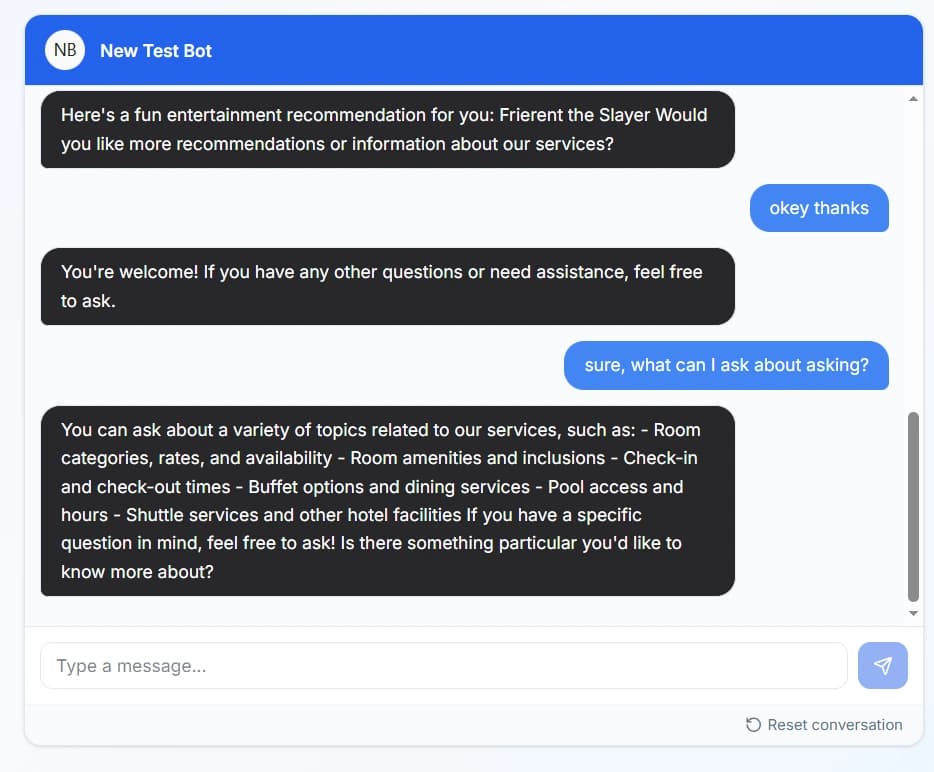
Where to find the Playground
Select Playground from the sidebar in your dashboard.
Once you're there, you can start sending messages to your chatbot and review its responses.
Testing your bot
The best way to evaluate your bot is to test it with questions that reflect what your customers might actually ask.
1. Ask common questions
Start with frequently asked questions about your business, products, or services.
For example, you might ask about delivery options, business hours, return policies, or payment methods.
Check whether the response is accurate, relevant, and easy to understand.
2. Try different ways of asking
Customers won't always phrase their questions the same way.
Try asking the same question using different wording to see whether your bot can respond appropriately.
For example:
- "What payment methods do you accept?"
- "Can I pay using GCash?"
- "Do you accept cashless payments?"
This can help you identify questions or phrasing your current training data may not adequately cover.
3. Review the responses
When reviewing a response, consider the following:
- Accuracy: Is the information correct?
- Relevance: Does the response address the question?
- Completeness: Does it include the information the customer needs?
- Tone: Does it match the personality you want your bot to have?
- Clarity: Is the answer easy to understand?
If a response is inaccurate, incomplete, or unclear, use that result as a starting point for improving your bot.
Improving your bot using Playground results
The Playground is most useful when you treat testing as an ongoing process.
If your bot struggles to answer a question, consider what might need to change.
Missing information
If the answer isn't available in your bot's training data, add the relevant information using the appropriate training method.
Incorrect or incomplete answers
Review your existing training data and update information that is outdated, ambiguous, or incomplete.
Responses with the wrong tone
If the response doesn't match your brand's voice, review your bot's Identity settings and test again.
After making changes, return to the Playground and repeat the same test to check whether the response has improved.
Tips for testing
- Test common customer questions before trying unusual scenarios.
- Use different phrasings of the same question.
- Check answers against your actual business information.
- Keep track of questions your bot struggles with.
- Retest important questions after changing training data or bot settings.
- Don't assume a single successful response means every variation will work equally well.
Consistent testing helps you spot weaknesses and improve your chatbot before customers encounter them.
You may also want to check out these guides
Did this fix it?
If you are unable to solve your issue, tell us what happened. You do not need to be signed in.